
Transaction Flow

Transaction List

The Reseller needs to develop the different transactions in order to get all the information required for creating a reservation that can be successfully sent to the Supplier via the Travel Curious Reseller API.

Info

Please note that the order in which the calls are made is very important. IDs received in the responses are used for the next request which would fail without these IDs.

  1. Suppliers - mandatory

    1. Get one supplier: GET /suppliers/{supplier_id}

    2. Get multiple suppliers: GET /suppliers

  2. Products - mandatory

    1. Get one product: GET /suppliers/{supplierid}/products/{product id}

    2. Get multiple products: GET /suppliers/{supplier_id}/products

  3. Rates - mandatory

    1. Get one rate: GET /suppliers/{supplierid}/products/{product id}/rates/{rate_id}

    2. Get multiple rates: GET /suppliers/{supplier_id}/products/{product_id}/rates

  4. Price Schedule - mandatory

    1. GET/suppliers/{supplier_id}/products/{product_id}/pricing/schedule

  5. Availability - mandatory

    1. Retrieve a single availability: GET /suppliers/{supplierid}/products/{product id}/availability

    2. Retrieve a list of availabilities: GET /suppliers/{supplier_id}/products/{product_id}/availabilities

  6. Create Hold - mandatory

    1. POST/holds

  7. Create booking - mandatory

    1. POST /bookings

  8. Cancel booking - optional

    1. PUT /bookings/cancel/{booking_id}

  9. Retrieve hold - optional

    1. GET /holds/{hold_id}

  10. Release hold - optional

    1. DELETE /holds/{hold_id}

  11. Retrieve booking - optional

    1. GET /bookings/{booking_id}

Transaction Diagram

This diagram shows the transaction dialog between you and Travel Curious. The numbers link the API call names and their link to the API spec to the order in which the call is made.
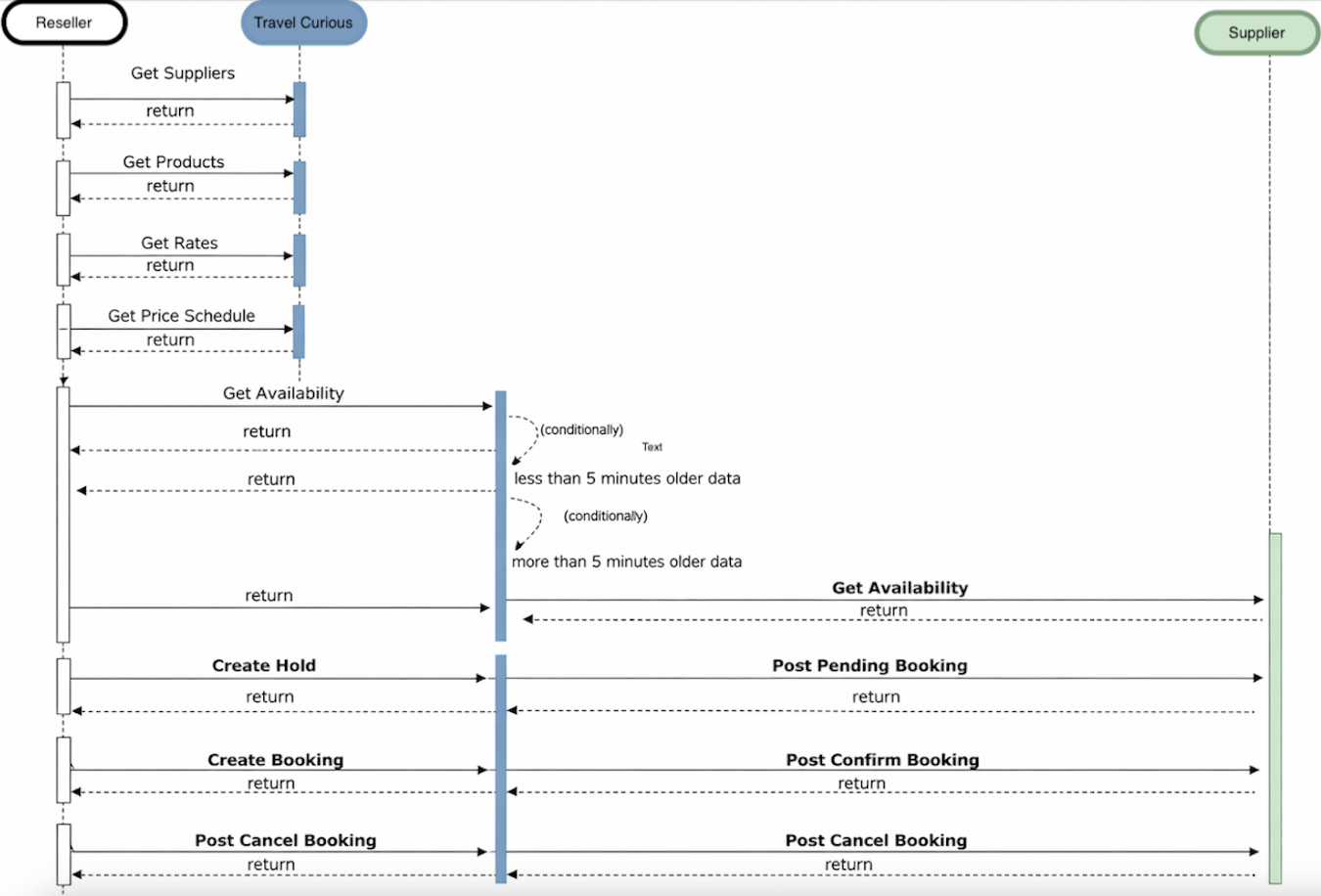

Transaction Flow Example

This example demonstrates the steps required for a booking using the Travel Curious Reseller API referred to the numbers linking the calls to the diagram above:

1 Get Supplier

Request

curl --request GET \
--url 'https://booking.redeam.io/v1.2/suppliers?partner_id={partner_id}&code={code}' \
--header 'X-Request-ID: {X-Request-ID}' \
--header 'X-API-Key: {X-API-Key}' \
--header 'X-API-Secret: {X-API-Secret}'

Response

{
"meta": {
"data": {},
"reqId": "PostmanBookingAPI_9323aaa4-9cca-40fc-bb6d-da0be3c3e8e0"
},
"suppliers": [
{
"businessType": [],
"code": "WWW",
"contacts": [],
"ext": {},
"id": "1ab0c295-1d16-4b5e-8719-9e7eeb13b3c6",
"mainLocation": {
"name": "Wisconsin",
"notes": "",
"website": ""
},
"name": "Wisconsin Widget World",
"octoID": "1ab0c295-1d16-4b5e-8719-9e7eeb13b3c6",
"version": 2
},
{
"businessType": [],
"code": "9bd156aa-6a83-4f28-8667-bf6f9ec089fb2",
"contacts": [

2 Get Product

Request

curl --request GET \
--url 'https://booking.redeam.io/v1.2/suppliers/{supplier_id}/products?limit={limit}&offset={offset}&partner_id={partner_id}&code={code}' \
--header 'X-Request-ID: {X-Request-ID}' \
--header 'X-API-Key: {X-API-Key}' \
--header 'X-API-Secret: {X-API-Secret}'

Response

{…}

3 Get Rate

Request

curl --request GET \
--url 'https://booking.redeam.io/v1.2/suppliers/{supplier_id}/products/{product_id}/rates?valid_during_end={valid_during_end}&valid_during_start={valid_during_start}&valid_from={valid_from}&valid_until={valid_until}&limit={limit}&offset={offset}&option_id={option_id}&partner_id={partner_id}&code={code}' \
--header 'X-Request-ID: {X-Request-ID}' \
--header 'X-API-Key: {X-API-Key}' \
--header 'X-API-Secret: {X-API-Secret}'

Response

{…}

4 Get Price Schedule

Request

curl --request GET \
--url 'https://booking.redeam.io/v1.2/suppliers/{supplier_id}/products/{product_id}/pricing/schedule?start_date={start_date}&end_date={end_date}&rate_id={rate_id}' \
--header 'X-API-Key: {X-API-Key}' \
--header 'X-API-Secret: {X-API-Secret}'

Response

{…}

5 Get Availability

Request

curl --request GET \
--url 'https://booking.redeam.io/v1.2/suppliers/{supplier_id}/products/{product_id}/availabilities?end={end}&start={start}&rate_id={rate_id}' \
--header 'X-Request-ID: {X-Request-ID}' \
--header 'X-API-Key: {X-API-Key}' \
--header 'X-API-Secret: {X-API-Secret}'

Response

{…}

6 Create Hold

Request

{
"hold": {
"ext": {
backend":"standard-adapter-mock-res"
},
"id": "f7393cf6-097d-443a-919a-ae3ca518e040",
"items": [
{
"at": "2023-01-22T16:00:00.000Z",
"availabilityId": "7894e608-d3e0-4e4a-9f3e-fef07c1ebae4",
"ext": {
backend":"standard-adapter-mock-res"
},
"id": "7b9cb23b-cba2-430f-b513-212a3be90c23"
"priceId": "cc7eea8c-6896-4ff3-82ff-a4399aea9264",
"productId":"02f0c6cb-77ae-4fcc-8f4d-99bc0c3bee18",
"quantity": 1,
"rateId": "0666f27f-2f16-4eba-91b7-28f08ce095d2",
"supplierId": "fc49b925-6942-4df8-954b-ed7df10adf7e",
"travelerType": "ADULT"
}
],

Response

{
"hold": {
"expires": "2023-01-18T14:03:28Z",
"ext": {
"backend": "standard-adapter-mock-res"
},
"id": "f7393cf6-097d-443a-919a-ae3ca518e040",
"items": [
{
"at": "2023-01-22T16:00:00.000Z",
"availabilityId": "7894e608-d3e0-4e4a-9f3e-fef07c1ebae4",
"ext": {
"backend": "standard-adapter-mock-res"
},
"id": "7b9cb23b-cba2-430f-b513-212a3be90c23",
"priceId": "cc7eea8c-6896-4ff3-82ff-a4399aea9264",
"productId": "02f0c6cb-77ae-4fcc-8f4d-99bc0c3bee18",
"quantity": 1,
"rateId": "0666f27f-2f16-4eba-91b7-28f08ce095d2",

7 Create Booking

Request

{
"booking": {
"barcode": {
"format": "UNKNOWN",
"value": "test"
},
"customer": {
"email": "daniel@g2rail.com"",
"firstName": "Daniel",
"lastName": "Teng"
"phone":""
},
"holdId": "f7393cf6-097d-443a-919a-ae3ca518e040",
"items": [
{
"availabilityId": "FHA[35578179]_S[2022-08-28T03:00:00-10:00]",
"productId": "{{product_id}}",
"priceId": "cc7eea8c-6896-4ff3-82ff-a4399aea9264",
"quantity": 1,
"rateId": "0666f27f-2f16-4eba-91b7-28f08ce095d2",
"startTime": "2023-01-22T16:00:00.000Z",
"supplierId": "fc49b925-6942-4df8-954b-ed7df10adf7e",

Response

{…}

8 Cancel Booking

Request

curl --request PUT \
--url 'https://booking.redeam.io/v1.2/bookings/cancel/{booking_id}' \
--header 'X-Request-ID: {X-Request-ID}' \
--header 'X-API-Key: {X-API-Key}' \
--header 'X-API-Secret: {X-API-Secret}'

Response

No response body, only 200 or other errors