
Ticketmaster SafeTix™ is a proprietary technology that replaces static barcodes with dynamic QR codes. This system reduces ticket fraud from counterfeits and provides attraction owners with greater visibility into the fans attending their events. Currently, 65% of Ticketmaster events are SafeTix-enabled, and this number continues to grow.
To support this, Travel Curious has implemented a SafeTix™ Alternative Integration Flow. This allows Reseller partners to receive a redemption link in the booking confirmation that directs customers to their tickets via Ticketmaster.
SafeTix™ Flow
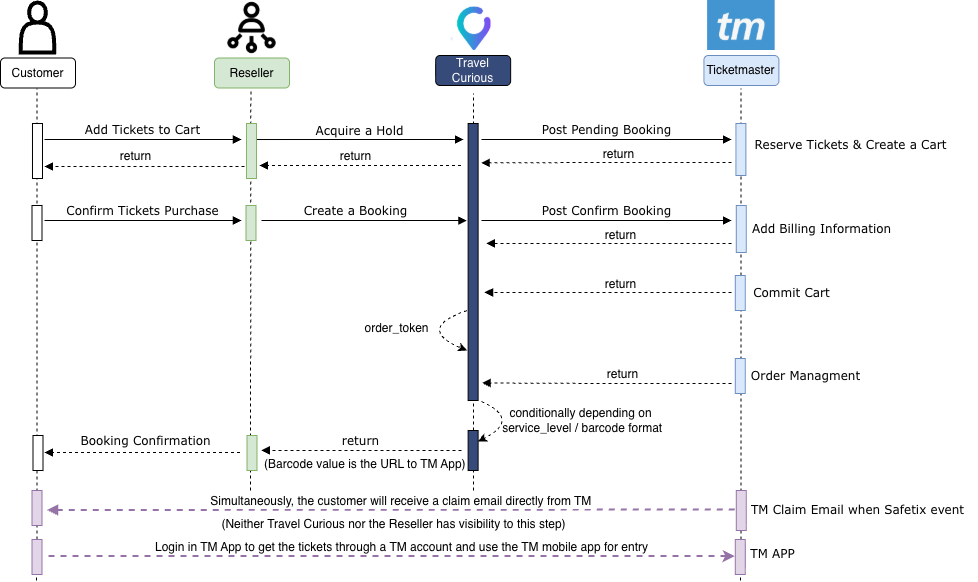
Key Features of the SafeTix™ Flow
Direct Redemption: Customers receive a redemption link via the Reseller’s confirmation and a direct "claim" email from Ticketmaster.
Strictly Operational: The automated Ticketmaster email is used solely for ticket redemption and is not utilized for marketing or customer acquisition.
Cobranding: Resellers can have the Ticketmaster redemption email cobranded to reinforce their own brand identity with the customer.
Seamless API Transition: Resellers use the existing Acquire a Hold and Create a Booking endpoints; the primary change is the format of the returned barcode.
Technical Specifications: Travel Curious Barcode Formats
Resellers must be prepared to handle two distinct types of responses depending on whether the product is SafeTix-enabled.
Non-SafeTix™ Products
For standard products, Travel Curious delivers a static barcode value.
Field:
tickets.barcode.formatSupported Formats:
QR_CODE,CODE128,CODE39,EAN13,TEXT,UPCA, orINTERLEAVED.Value: A static alphanumeric string (e.g., "
4682234175198089431").
SafeTix™ Products
For SafeTix™ products, no static barcode is provided because the QR code is dynamic.
Field: tickets.barcode.format will return " URL ".
Value: A specific Ticketmaster redemption URL (e.g., https://myorder.ticketmaster.com/redeem?token=...).
‼️ Single Voucher Logic: In a SafeTix™ booking, a single URL link represents the entire booking, regardless of the guest count.
Reseller Implementation Requirements
To ensure a successful customer experience, Resellers must update their systems to handle the URL barcode format.
UI Display: The redemption URL should be placed wherever a barcode was previously shown, including confirmation pages, emails, and ticket retrieval sections in apps. Note: There is a higher claim rate when partners add the link to the order confirmation page!
Identifying SafeTix™: Resellers can identify these products by checking the
ticketmaster.SafetixProductflag (true/false) in the product response.Custom Wording: Travel Curious provides a pre-written message in the
booking.extensions.ticketmaster.safetixfield in case the Reseller would like to use it somewhere in the voucher or anywhere else that can be helpful."The redemption URL will direct the fan to Ticketmaster website to claim the tickets. Simultaneously, the fan will receive a claim email from TM.".
Alternative Options:
If a Reseller cannot handle the URL format immediately:
Display a message advising the customer to look for the direct Ticketmaster email.
Contact Travel Curious to discuss alternative display possibilities.
Customer Experience & Support
Entry Requirements
Digital-Only: Customers must be informed that these tickets cannot be printed.
Scannable Mobile Ticket: They must present the dynamic QR code on their phone at entry.
No Screenshots: Screenshots will not be accepted for entry.
** ‼️ Availability: Depending on the event, tickets may be released closer to the event date. In these cases, the Ticketmaster page will display the specific date and time they will become available, something like the message below: **

Direct Ticketmaster Interaction
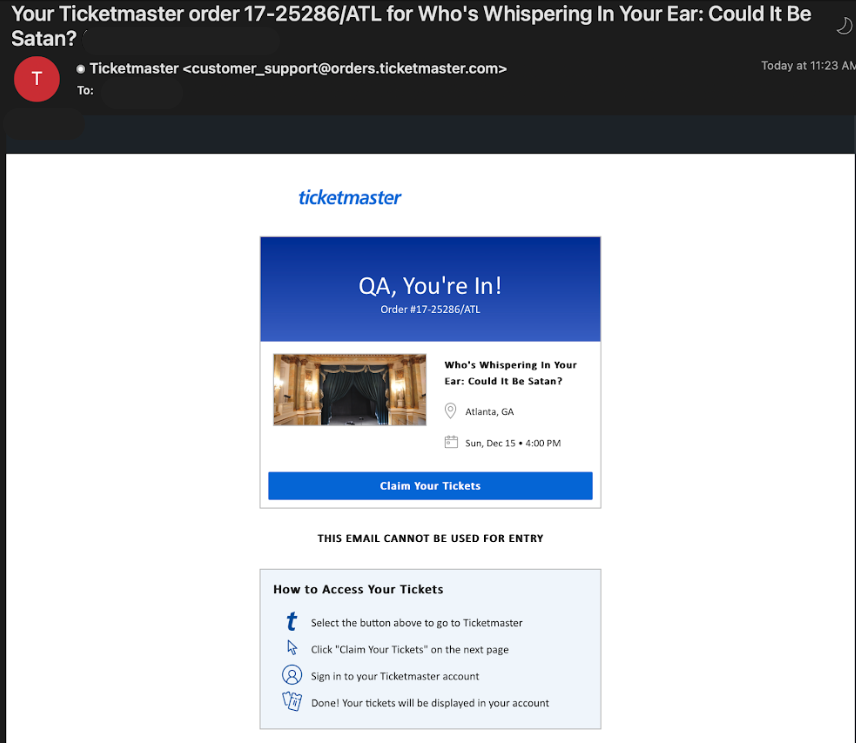
Simultaneously with the booking, Ticketmaster sends a claim email from customer_support@orders.ticketmaster.com.
Visibility: Neither Travel Curious nor the Reseller has visibility into this automated email.
Reminders: Ticketmaster sends backup and reminder emails if tickets remain unclaimed as the event date approaches.
Delivery: Ticketmaster system has backup processes for the SafeTix™ email delivery to customers to claim tickets - but never had issues delivering
Ticketmaster email example:
Once the customer logs in to the Ticketmaster website, they will be able to see the details of their purchase, something like this:
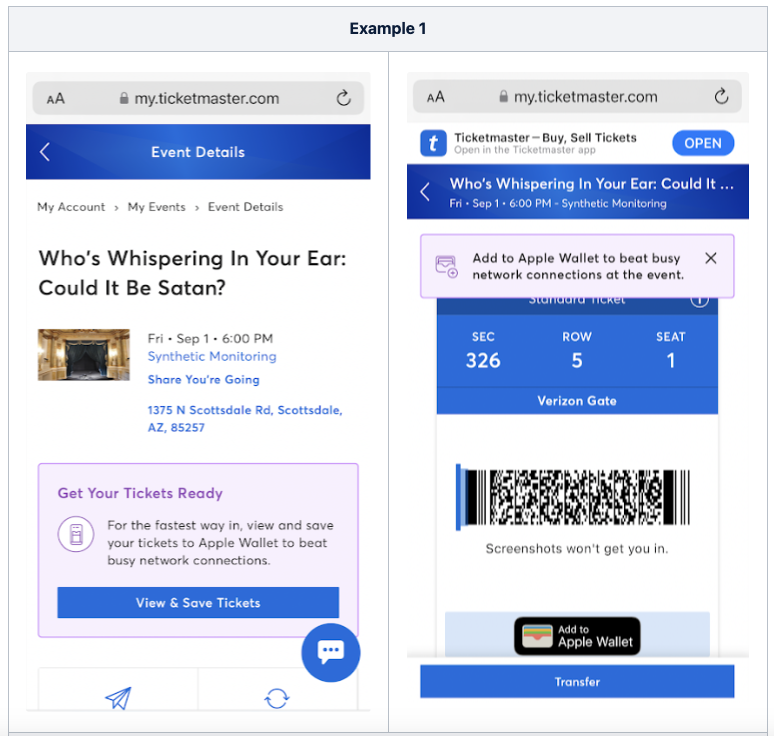
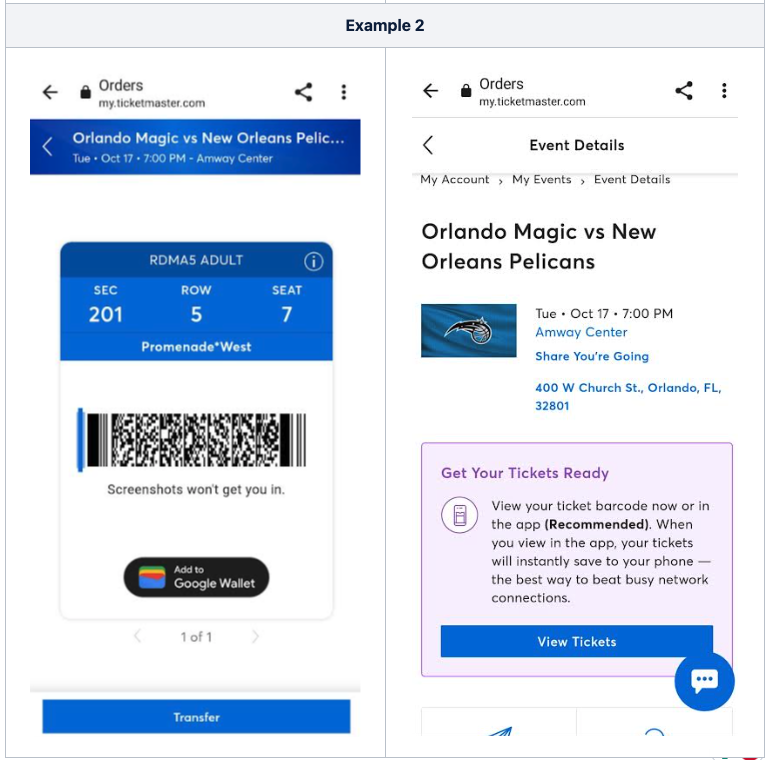
IMPORTANT!
For international clients, the process to view the scannable tickets has to be through the Ticketmaster mobile web; it won't be displayed if they use the desktop version.
This means the customer has to open the booking confirmation link on their phone, or directly open the browser on their phone and search for the Ticketmaster login page to use their account. Once logged in, they will be able to see the scannable tickets displayed on the page. This way, international customers can view tickets without downloading the Ticketmaster App.
Travel Curious Best Available Flow & SafeTix™
These SafeTix™ products will work in conjunction with our Best Available flow to allow the Reseller to distribute Live Events without the need to implement seat selection functionality and still communicate the seat details purchased to the end consumer.
For more implementation details, please refer to the Best Available Flow page.
SafeTix™ Booking Response
Here is an example of Travel Curious Booking response with a SafeTix™ product type