
This document explains what Reseller partners need to know when integrating with Ticketmaster® Microflex events through the Travel Curious platform. It focuses specifically on how Microflex-confirmed bookings differ from other Ticketmaster® ticketing-system source values (including TM_US , TM_UK, and Universe ) in the booking response and customer fulfillment experience.
What this document is about: Microflex sourced partners have a special Ticketmaster® fulfillment pattern where, confirmed bookings do not return ticket fulfillment artifacts such as barcodes, QR codes, or redemption URLs in the API booking confirmation response.
Scope note: This document is intentionally limited to Microflex behavior. It is not a complete Ticketmaster® integration guide and does not replace the full Reseller API reference.
Overview
For standard Ticketmaster® (TM_US, TM_UK) and Universe events, a successful POST to the Bookings confirm endpoint typically returns a real, scannable fulfillment artifact for each ticket, such as a barcode, QR Code, or redemption URL (Safetix® events) directly in the booking confirmation response. This is not the case for Microflex events.
Microflex changes that flow. For Microflex-sourced events, the booking still confirms normally (same request/response shape, same success/failure semantics as any other booking), but the ticket entries in the response do not carry a real scannable value. Instead, each ticket returns a TEXT-format instruction telling the customer to retrieve their ticket through their Ticketmaster® account.
In short: Microflex changes the fulfillment contract, not the booking contract.
Suppliers, Products, Rates, Availability, and Price Schedule calls behave the same as any other Ticketmaster® source; no Microflex-specific handling is required there.
The booking confirmation call itself succeeds/fails under the same rules as any other booking.
What's different is only what comes back in the ticket/barcode object, and how the customer actually gets their ticket afterward.
Instead of receiving a Ticketmaster®-supplied QR Code or URL at confirmation time, the Reseller receives a default text delivery instruction.
Ticket delivery is completed through Ticketmaster® email communications, the Ticketmaster® website, or the Ticketmaster® app.
How to Identify Microflex Events (Coming soon)
Microflex events can be identified in the current implementation by using the beta-sourceSystem extension key, present on both the Supplier object and the Booking response. This value identifies the underlying Ticketmaster® ticketing-system source and helps partners determine which fulfillment behavior to expect.
Example: Possible source-system values include TM_US, TM_UK, Universe, and MFX. For Microflex, a value such as MFX source variant indicates that the booking should follow the Microflex fulfillment expectation: confirmed bookings will return instructional delivery text instead of a real scannable code in barcode.value.
Partners and support teams can use this beta-sourceSystem value as additional context when present and branch your fulfillment display logic on it (real code vs. text instruction) and when reviewing bookings.
What Is Different for Reseller Partners
Area | Standard TM ( | Microflex |
|---|---|---|
Supplier, Product, Rates, Availabilities, and Price-Schedule transactions | Usual API response structures continue to apply for these endpoints | No Microflex-specific response-structure updates are required from the Reseller perspective for these transactions |
Booking confirmation | API Booking response usually includes barcode format and value on booking confirmation response with real scannable values or URL link to the real scannable code | API Booking response can be confirmed without real scannable code included |
Expected delivery content | Barcode, QR code, redemption URL (Safetix® link ) | Instructional delivery text |
Customer ticket access | Often through | Via the customer's Ticketmaster® account / app / direct TM email, using the purchase email address |
Partner validation logic | Often assumes direct ticket real barcode value is present | Must not treat real barcode value absence as booking failure |
Booking Confirmation Response: Ticket Mapping and Barcode Details
For Microflex events, the booking confirmation response still includes tickets entries, but those entries are mapped as instructional text rather than real scannable ticket artifacts. Reseller systems should inspect both barcode.format and barcode.value before deciding how to display or validate the ticket content.
In the booking confirmation response, each ticket will be returned with:
barcode.formatset toTEXTbarcode.valueset to the default instruction:Tickets will be available in your Ticketmaster account associated with the purchase email address
This barcode.value is not a barcode, QR code, or SafeTix® link. It's fulfillment guidance meant to be displayed to the customer as text — it should never be parsed, rendered, or scanned as an admission credential.
Example
The example above shows one ticket object per mapped booking item. Both ticket objects are valid for Microflex fulfillment even though the returned barcode.value is instructional text rather than a real scannable value.
Recommended interpretation: If the booking is confirmed and the delivery format is text-based, treat the order as successfully fulfilled according to the Microflex contract.
For reference: the Reseller API's barcode.format and deliveryFormats (under add-on models) enums already include TEXT and URL alongside QR_CODE, CODE128, EAN13, etc., so a text-based delivery format is a recognized, first-class value in the schema, not a workaround.
Illustrative Test Scenario
To make this concrete, here is a test scenario with a Microflex test booking (Order 34016993 — "Testevent Distributed Commerce," Theater am Potsdamer Platz, Sat 10 Apr 2027, 2 tickets: 1 Adult + 1 Child):
Booking confirmed via the Reseller API with
barcode.format = TEXTandbarcode.value = "Tickets will be available in your Ticketmaster account associated with the purchase email address".No scannable code returned.Welcome email (conditional - only if the purchase email doesn't already have a Ticketmaster® account) → ~5 minutes after the booking is confirmed, Ticketmaster® sends a welcome email as the account is created.

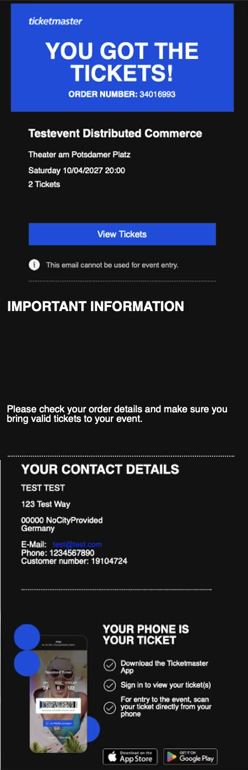
Order confirmation email ("Your Ticketmaster order 34016993") → sent confirming the order, showing the order summary (level/section/row/seat), and stating the eTickets are available via the customer's Ticketmaster® account and app. This email explicitly states it cannot be used for event entry.
PDF ticket email ("Your tickets are attached") (conditional - only for events/markets configured for PDF tickets) → sent ~5 minutes after the order confirmation email in this test order, with a PDF attachment containing the actual, real, scannable tickets, full barcodes, seat details, and venue admission info. In digital/mobile-ticket markets, this email is not sent at all, see the callout below.
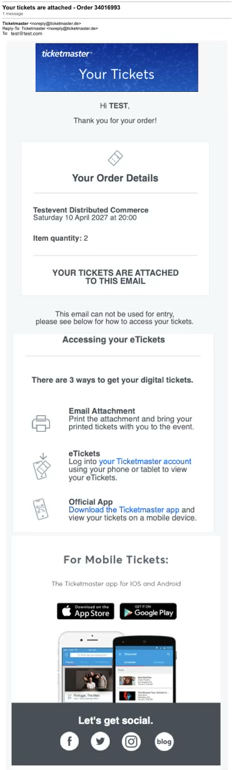
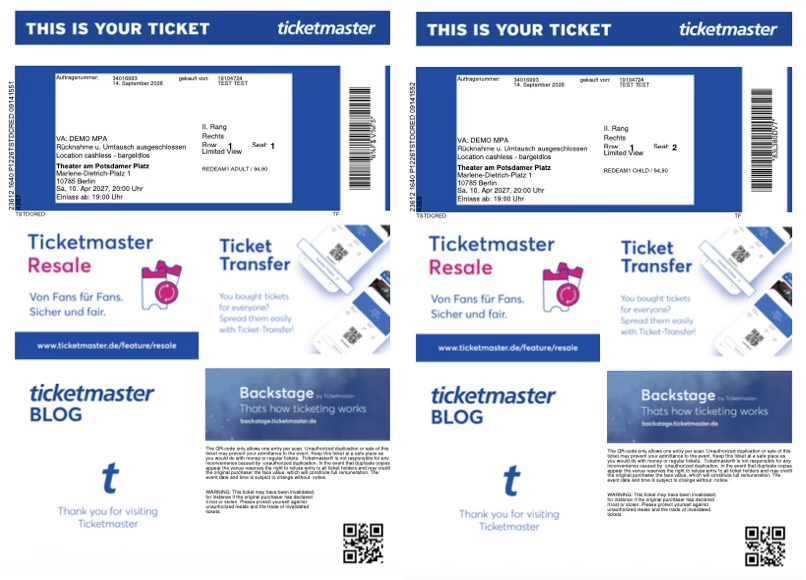
The PDF ticket email only occurs for markets configured for PDF tickets, the fan gets an order confirmation email followed by a separate second email with the PDF ticket attached. For digital/mobile ticket markets, the fan receives the order confirmation email only, no separate PDF email is sent, and tickets are accessed directly through the Ticketmaster account/app instead. Partners should not assume every Microflex order includes a PDF email, whether one is sent at all depends on how the market/event is configured on Ticketmaster's side. (The welcome email is a separate, account-creation-triggered email and follows its own condition, independent of PDF vs. digital ticket format.)
This is the key takeaway for partners: real scannable tickets do get issued for Microflex bookings, they're just issued and delivered by Ticketmaster® directly (email / account / app), outside the Reseller API's booking response. The absence of a real barcode in the API response is not a sign that fulfillment failed or is incomplete; it's the expected Microflex pattern.
This is a useful illustration of the intended fulfillment pattern: the booking confirms in the reseller flow, while final customer ticket access is delivered through Ticketmaster®-managed channels.
Microflex Integration Requirements
1. Preserve the purchase email relationship
The customer's Ticketmaster® ticket access is tied to the email address used at booking. Using mask emails will be a blocker for Microflex events
The customer experience may depend on the email address used during booking.
If the customer already has a Ticketmaster® account under that email, tickets appear there automatically.
If the customer does not already have an account, Ticketmaster® may create or enable access via that email — the customer will receive a separate welcome email in that case (see Illustrative Test Scenario flow).
Your post-booking messaging should tell the customer to sign in with the same email address used at purchase.
2. Accept text-based delivery (recommended, not mandatory)
Your integration could support ticket delivery responses that use a text-based format rather than a code or URL.
The reseller system should not require every confirmed Microflex booking to contain a barcode value or a redemption URL.
The reseller system should accept and be able to display a text-based delivery instruction when one is returned.
Displaying this instruction in your own confirmation UI is recommended if you want to reinforce fulfillment guidance, but it's optional. You can instead rely on Ticketmaster®'s own direct email/account communications, as shown in the real-order evidence above.
3. Update UI and booking confirmation messaging
Reseller-facing and customer-facing interfaces could be prepared for this scenario.
Do not show a booking as incomplete when the response includes a barcode object whose format is
TEXT; for Microflex, thebarcode.valuecontains instructional text rather than a scannable code.Do not prompt agents or customers to “wait for barcode generation” by default. The customer is expected to receive Ticketmaster® confirmation and ticket-delivery communications directly from Ticketmaster®.
If you display fulfillment guidance in your own UI, present the returned text instruction clearly as booking information rather than as an entry barcode or QR code.
4. Review downstream business rules
Some reseller implementations hard-code assumptions about ticket delivery. These assumptions should be reviewed for Microflex compatibility.
Audit any automation (support tooling, fulfillment checks, QA alerts) that assumes every confirmed booking response contains a scannable barcode, QR code, or redemption URL.
Rules should not validate Microflex bookings by expecting
barcode.valueto contain a scannable code or URL.Partner logic should support
barcode.format = TEXT, wherebarcode.valuecontains delivery instructions rather than an entry credential.
Important: If your middleware or customer support tooling interprets “missing ID barcode or URL” as a defect, Microflex bookings may be incorrectly flagged as failed or incomplete.
Customer Experience Guidance
For Microflex events, customer communications should emphasize account-based access and/or attachment-based ticket retrieval.
Recommended customer guidance:
"Your booking is confirmed."
"Your tickets will be available through your Ticketmaster® account and /or email address used for the purchase."
"You can sign in using the same email address used for the purchase to access your tickets."
Implementation Expectations for Partners
Support confirmed bookings that don't include an immediate barcode, QR code, or redemption URL
Support and display
barcode.format = TEXTdelivery instructionsGuide customers to sign in to their Ticketmaster® account with the purchase email address
Train support teams that “no barcode returned” can be normal for Microflex, not a failure
Audit and update any automated workflow, alerting, or validation logic that currently assumes a scannable artifact is always present on confirmation
Implement the extension key
beta-sourceSystem, present on both the Supplier object and the Booking Confirmation Response