
The Reseller needs to develop the different transactions in order to get all the information required for creating a reservation that can be successfully sent to the Supplier via the Travel Curious Reseller API.
The order in which the calls are made is very important. IDs received in the responses are used for the next request, which would fail without these IDs.
Transaction Endpoint Summary
Step | Call | Required | Link(s) |
|---|---|---|---|
1 | Get Supplier(s) | Yes | |
2 | Get Product(s) | Yes | |
3 | Get Rate(s) | Yes | |
4 | Get Price Schedule | Yes | |
5 | Get Availability | Yes | |
6 | Create Hold | Yes (when | |
7 | Create Booking | Yes | |
8 | Cancel Booking | Optional but Highly Recommended | |
9 | Get Hold | Optional | |
10 | Release Hold | Optional | |
11 | Get Booking | Optional |
Transaction Diagram
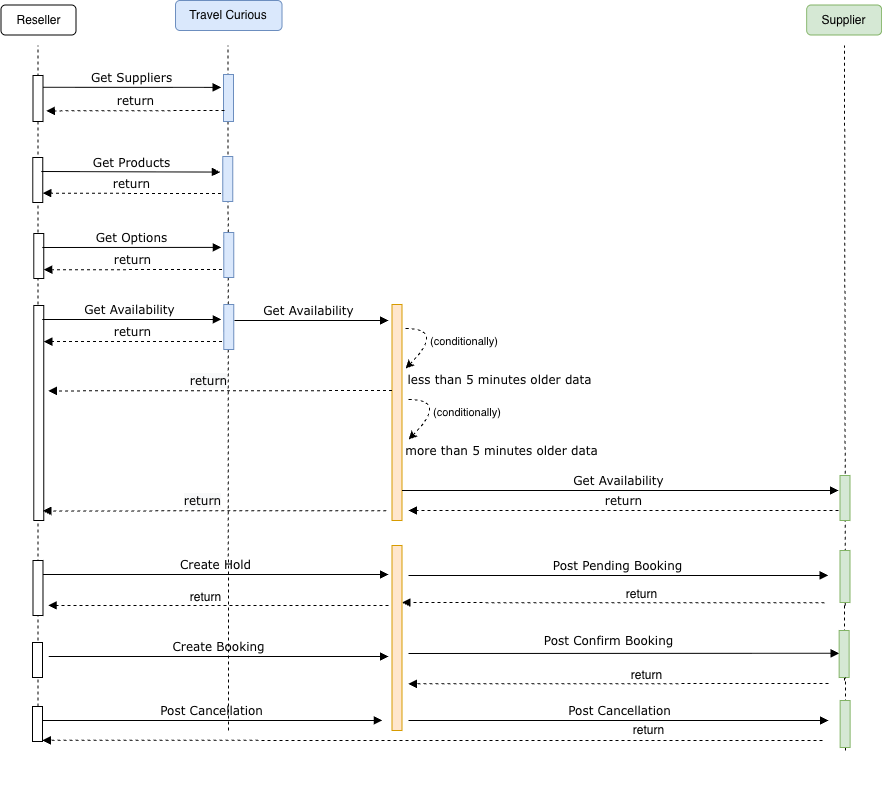
Transaction Flow Example
This example demonstrates the steps required for a booking using the Travel Curious Reseller API. The following example walks through a complete booking using v1.3. Replace placeholder values ({supplier_id}, {product_id}, etc.) with real IDs from your environment.
Note: The examples below use the /v1.3/ base path. If you are integrating with the legacy version, simply replace /v1.3/ with /v1.2/ in the URL string.
Add content=true to fetch rich media and descriptions in v1.3
1. Get Supplier
Use this call to discover available Suppliers and retrieve their IDs.
Request
Response
2. Get Product
Retrieve the Products offered by your target Supplier.
Request
Response
3. Get Rate
Retrieve the available Rates for your target Product. Each Rate defines hours, cancellation policy, and hold rules.
Note the holdable and holdablePeriod values - they determine Hold behaviour in Step 6.
v1.3: If the Rate includes a bookingQuestions[] array, review each question's phase and scope before proceeding.
Questions with phase: hold must be answered in Step 6 (Create Hold); questions with phase: booking must be answered in Step 7 (Create Booking). See
Holds, Bookings & Cancellations for submission format.
Request
Response
4. Get Price Schedule
Retrieve the active price schedule for the target date range. Price Schedule prices always override the static prices[] in the Rate response - always use them when available.
The response is structured as: { rate_id → { date → [PriceScheduleItem] } }. Use the id from the matching PriceScheduleItem as your priceId in Step 6 (Create Hold) and Step 7 (Create Booking). If startTimes is non-empty, your at time in the Hold must match one of the listed values exactly.
Request
Response
5. Get Availability
Confirm availability for the specific time slot and quantity you intend to hold. Run this check immediately before placing a Hold to avoid failures caused by stale data.
Store the availability id - it is required as availabilityId in the Hold and Booking.
Request
Response
6. Create Hold
Place a Hold to reserve inventory while the guest completes checkout. The Hold locks the selected slot for the duration of the holdablePeriod.
Store the Hold id and note the expires time. The Booking must be created before the Hold expires.
v1.3 : If the Supplier returned BookingQuestions during the availability or rate phase with a phase: "hold", you must provide the BookingAnswers array in this payload.
Request
Response
7. Create Booking
Convert the Hold into a confirmed Booking. All supplierId, rateId, priceId, and traveler details must match the Hold exactly.
Store the Booking id. Tickets and barcodes are returned here and available via GET/bookings/{booking_id}
v1.3 If the Supplier returned BookingQuestions with a phase: "booking", you must provide the BookingAnswers array in the BookingAnswers object of the payload.
Request
Response
8. Cancel Booking (optional, but highly recommended)
Cancel a confirmed Booking using its booking_id. Only available when the Rate's cancelable flag is true.
When available, add more context to Booking cancellations with reason and reasonDetails fields.
Request
Response
A successful cancellation returns 204 No Content
9. Get Hold (optional)
Retrieve an active Hold by its ID. Returns the same structure as the POST /holds response.
Request
Response
10. Release Hold (optional)
Release a Hold when a guest abandons their cart or closes the browser. This immediately frees the reserved capacity for other customers, rather than waiting for it to expire automatically.
Request
Response
A successful release returns 204 No Content.
11. Get Booking (optional)
Retrieve a Booking by its ID at any point after confirmation. Useful for polling PENDING bookings and for retrieving ticket data asynchronously.
If the Supplier's system returns a 202 Accepted on booking creation (indicating asynchronous processing), poll this endpoint at a reasonable interval until the status moves from PENDING to OPEN or FAILED.
Request
Response