
Disneyland Resort® (DLR) is transitioning its ticketing model from whole-package tickets to a new component-based structure. To support this without requiring you to adopt an entirely new data schema, Travel Curious is mapping these DLR components directly onto our standard Supplier, Product, Rate & Price Schedule models and introducing Add-ons and Content capabilities.
This guide outlines the overarching integration requirements, data extensions, and pricing rules required to successfully distribute DLR products.
What's Changing
API v1.3 is Mandatory: DLR products will now be distributed exclusively via our v1.3 API. Legacy versions will no longer support the new DLR inventory data structure.
The Shift to Add-Ons: Park reservations (e.g., Disneyland Park® vs. Disney California Adventure®) are no longer bundled into the base ticket; they are now mapped as mandatory Add-Ons. Optional upgrades, like the Lightning Lane Multi Pass®, are also managed through this Add-Ons capability.
Dynamic Aggregate Pricing: Previously, pricing represented a single bundled package. Because tickets are now component-based, the total booking cost is an aggregate, dynamically calculated as the sum of the base ticket and all selected Add-Ons across the chosen dates.
Optimized Availability Queries: To handle the massive data payloads generated by multi-day ticket validity windows, we now support both lightweight, high-level calendar responses and detailed, granular availability queries. This allows you to optimize how and when you retrieve data across your integration.
Rich Content Data: We are enhancing the content data available for DLR to help you build a more informative experience. As an example, we are transitioning away from legacy static policy URLs and mapping Terms & Conditions directly into our recently announced API Content capability object.
Booking Flexibility: The new component structure gives guests the ultimate freedom to customize their itineraries. Travelers on the same booking can now select different parks, visit on different days, and individually choose optional upgrades.
Supplemental Data Extensions: To provide context throughout the booking process, we are introducing new extension keys to the API payload. These keys provide useful operational data, ensuring you have the exact information needed for both backend logic and user display.
API Version Requirement
Action Required: Partners currently on v1.2 must upgrade to v1.3 before accessing DLR products.
DLR inventory is exclusively available via API v1.3. Partners currently utilizing legacy API versions must upgrade to v1.3 to access DLR products, as older versions do not support the required component-based architecture or Add-on data models.
Product Structure Hierarchy
DLR products map to the v1.3 API hierarchy, specifically down to the traveler level. With the changes, the general format will stay the same, but we will have to utilize the new Add-ons models on the rates.travelerType level. All Add-ons appear at the rates.travelerType level, not at the Product or Rate level. This is intentional, as future Add-ons may be age-specific (for example, character experiences restricted to children, or alcohol vouchers for adults only).
The hierarchy maps out as follows:
Supplier: Disneyland Resort (DLR)
Product: 1-Day Ticket
Product: 2-Day Ticket
Product: 3-Day Ticket
Product: 4-Day Ticket
Product: 5-Day Ticket
Rate: 1-Park-Per-Day
Rate: Park Hopper
BookingTraveler: Adult
addOns:
Disneyland Resort Admission Component
Disney California Adventure Admission Component
Lightning Lane Multipass Add-on Component
BookingTraveler: Child
addOns:
Disneyland Resort Admission Component
Disney California Adventure Admission Component
Lightning Lane Multipass Add-on Component
This structure means that when two adults and one child are booking a 2-day Park Hopper, each traveler type (Adult, Child) carries its own set of available add-ons. Adult admissions and Child admissions are separate add-on IDs, each with their own pricing in the Price Schedule.
Add-ons & Component-Based Architecture
Action Required: You must support the Travel Curious Add-Ons capability to sell DLR products.
Under the new DLR model, a "ticket" is no longer a single, bundled package. It is a base ticket plus a set of components that must be fulfilled - daily park reservations and optional upgrades. Travel Curious surfaces all of these components as Add-Ons.
Add-Ons in the DLR context serve two distinct purposes:
Mandatory Park Admission - Required for the booking to be valid. Each guest must have a park admission add-on for every day they intend to visit. This is the mechanism through which guests choose which park(s) to attend on each specific date within their ticket's valid window.
Optional upgrades - Enhancements such as Lightning Lane Multipass that are genuinely optional. A booking without them is still valid.
Both types use the exact same Add-Ons data model and submission mechanism.
You will interact with standard models such as AddOnAvailability, AddOnPrice, and AddOnItem throughout the booking flow. For complete JSON schemas, field definitions, and validation rules for these objects, please refer to the sections below and Reseller API Reference documentation.
The Two Add-On Types in Detail
Park Admission grants a single guest entry into a specific park on a specific calendar date. These are required for a booking to be considered valid by DLR. For example, a 2-day ticket requires two distinct Add-on components to be selected, representing one for each day. The available options are:
Add-on | What it covers |
|---|---|
Disneyland Resort Admission | Entry to Disneyland Park on a specific date |
Disney California Adventure Admission | Entry to Disney California Adventure Park on a specific date |
For a 1-Park-Per-Day Rate, the guest selects one park admission per visit day. For a Park Hopper Rate, both admissions are added for each visit day.
Optional upgrade components are true Add-ons, which provide additional services. Currently include:
Add-on | What it covers |
|---|---|
Lightning Lane Multipass | Skip-the-line access to eligible attractions on a given day. One per guest per day. |
More optional components may be added in the future. Build your add-on handling flexibly; do not hardcode the current list.
Requesting Add-On Data
To retrieve Add-on data, Resellers must explicitly request it using the v1.3 API endpoints. Pass addOns=true on the following endpoints to include them:
Endpoint | Date range limit with |
|---|---|
| No limit |
| No limit |
| 5 days maximum for DLR |
| 5 days maximum for DLR |
Date Range Limits: In general, when querying with addOns=true, the API enforces a maximum date range of 30 days. However, for DLR specifically, this will be a reduced window of approximately 5 days due to the extreme data volume.
To also receive Add-on content combine parameters: addOns=true&content=true
Constraints and Validation
While park reservations are mandatory for the booking to be valid, you will notice that the constraints array for Disneyland Resort Admission Component and Disney California Adventure Admission Component Add-ons does not enforce a min: 1 rule.
Each individual park is treated as a distinct Add-On. If the API enforced a programmatic minimum of 1 across all park Add-Ons, it would technically force the guest to book a reservation for every available park — when in reality, a guest with a Park Hopper selects which park to start from, and a guest with a 1-Park-Per-Day ticket chooses only one. Enforcing a blanket minimum would break both scenarios. Therefore, your frontend UI must handle this validation to ensure the guest actively selects the correct number of park reservations to match their ticket type and duration.
❌ Wrong (If API forced min: 1 globally): The UI forces the guest to select both Disneyland Park® and Disney California Adventure® for Day 1 because both individual Add-ons require a minimum quantity of 1. This would break the ticket restrictions for single-park per day rates.
✅ Right (How to build your UI): Your frontend logic must verify that the user selects exactly the correct number of park reservations to match their ticket duration. For a 2-Day ticket, the Reseller must ensure the user selects exactly 2 parks across the calendar. Crucially, this means exactly one park reservation must be selected for each day of the ticket, and this selection must be made for each individual traveler in the booking.
Availability Queries
Two-Step Flow
When querying DLR products, the API payload can become exceptionally large due to the ticket's fuse window (validity timeframe). The API must return the availability for every possible Add-on for every single day within that entire fuse window, bundled with the base ticket.
To manage this data volume and optimize performance, availability should be handled using a two-step process:
Step 1 - Initial Calendar (without Add-ons)
Initial GET Availabilities: A calendar should be displayed using GET Availabilities data retrieved without Add-ons (addOns=false). Even without addOns=true, this response includes extension keys that let you render the calendar accurately.
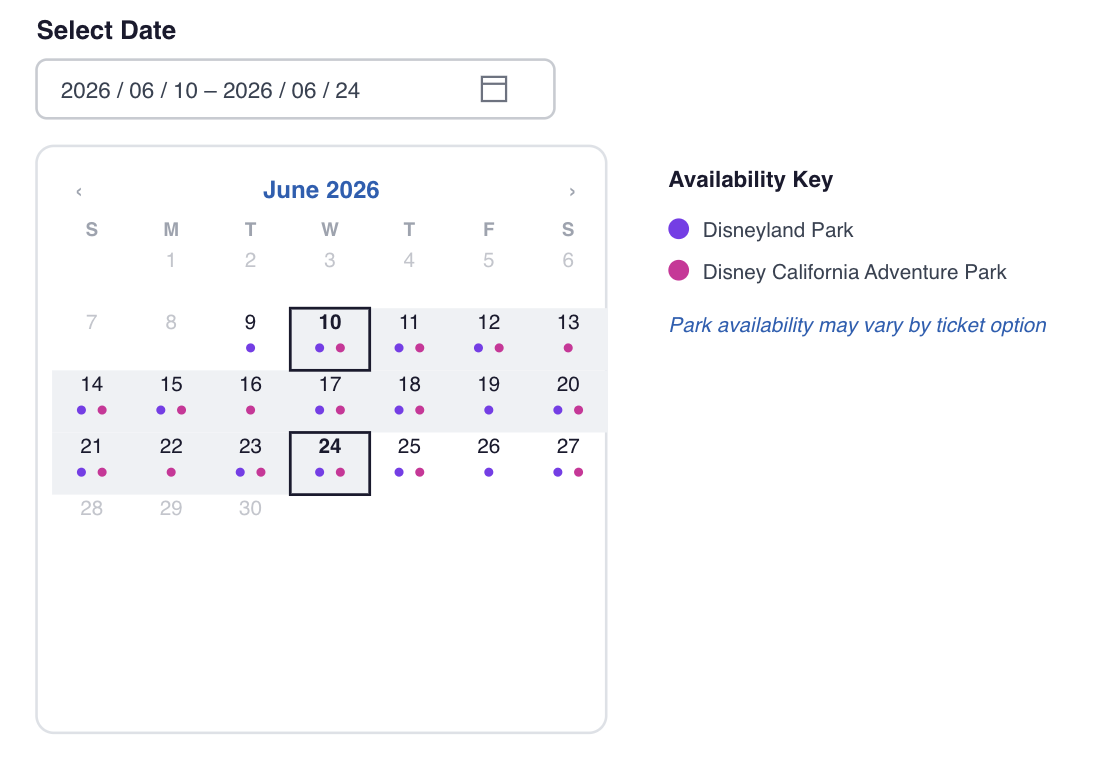
Park Availability Extensions: To help resellers display information in their UI per calendar date during the initial search, the GET Availabilities response includes extension key such as
disney-availableParks
Buffer Window Extension: The GET Rates response also includes a
disney-fuseWindowDaysextension key. This lets the reseller know the exact window available for making additional day selections.
Mockup Example: each day cell shows two indicators, one per park, driven by the extension flags above.
Step 2 - Targeted Add-on Queries (Post-Date Selection)
Once the user selects their initial date from the calendar, the Reseller must make targeted API calls for that specific day using addOns=true. To prevent massive payloads from crashing the experience, Travel Curious restricts the availability date ranges for DLR to a reduced window of approximately 5 days when the addOns=true parameter is passed. By waiting until the user selects a date, you can safely fetch the heavy Add-ons payload for just that specific timeframe. This is the data you use to render the per-day park selection UI.
Blockout Dates
We are removing availability for blockout dates entirely. You will simply not receive availability for these restricted dates, preventing users from booking them.
Fuse Window
The disney-fuseWindowDays extension is present on Rate response, defines the date range within which the guest can spread their visit days:
A 2-day ticket starting June 20 with a fuse window of 14 days will have an end date of July 3. This means the guest can choose any two dates between June 20 and July 3 for their park visits. Use this value to highlight the date picker you show after the guest selects their start date.
Price Schedule with Add-Ons
The PriceSchedule endpoints function identically to availability regarding Add-ons. All available Add-ons will be returned as part of the base ticket's start time.
The exact same 5-day maximum date range restriction applies when querying the Price Schedule with addOns=true due to the large amount of data returned.
Important: The base ticket price (the
retail/netat thePriceScheduleItemlevel) does not represent the full cost. Under the component model, the traveler/unit itself does not have a standalone meaningful price. The total price you present to the guest is the sum of all selected add-on prices for all visit days and all travelers.
Displaying "From" Prices in Your Catalog/UI
Because final pricing depends on the exact components selected, you must display estimated "From [Price]" values in your product catalog.
The prices returned in the Price Schedule response represent the lowest possible entry-level price we could find for that specific ticket tier. When rendering these to your users, structure your catalog to show the lowest available "From" rate based on the cheapest underlying configuration.
Content Capability
We are significantly enhancing the content available for DLR to help you build a more informative checkout experience.
General Supplier, Product, Rate, and Traveler Type content data will be mapped as closely as possible to the source data received from Disney.
Add-On Content: Add-ons can contain their own specific content capability data, which is completely separate from the main product's content data. Because DLR utilizes the standard Travel Curious Content architecture, the data models returned in these endpoints match the core Content capability exactly. For complete JSON schemas, field definitions, and validation rules for these objects, please refer to the Content capability page and Reseller API Reference documentation. Request it with
addOns=true&content=true.
Policy Mapping Transition
Policy data can be accessed in two ways:
Static URL mapping - via a static policy URL mapped to
beta-policyextension key, as before. This continues to be supported.Content capability - policy details are also available directly within the
contentobject, under theTERMS_AND_CONDITIONSfeature type in the GET Rate response.
Note: To retrieve content details, you must call the single GET Rate endpoint with the content=true parameter. For more details, see the Reseller API Reference
Hold and Booking Pricing Rules
When transitioning from the Price Schedule to creating a Hold, components must be added to the Hold-level addons.
Setting Component Dates: When submitting the hold payload, the
localDateTimeStartandlocalDateTimeEndfor each Add-On must exactly match the specific add-on date the guest selected to visit the park within their valid fuse window, not just the overall start date of the base ticket.
Price Population: Price fields within the
AddOnItemobject must be populated by the Reseller, representing the exact price at which the Add-On was sold. Travel Curious will not automatically inject or calculate this data during the Hold or Booking stages. You must always source the correct price from the Price Schedule response prior to submitting the payload.
Reseller API Booking Flow
To build a correct and performant DLR checkout experience, Resellers should follow this sequence:
Select Product: The user selects the base product (e.g., 1-day, 2-day, 3-day, 4-day, 5-day).
Select Option: The user selects the rate option (e.g., 1 Park Per Day or Park Hopper).
Select Guests: The user selects the total number of guests, including the specific breakdown of adults and children. This is critical because Add-ons components are tied directly to the
rates.travellerTypelevel (e.g., Adult Admission vs. Child Admission).View Calendar: A calendar is displayed with basic availability data, retrieved using a standard availability request where
addOns=false.Select Initial Date: The user selects their initial start date.
Fetch Add-ons: The Reseller makes targeted API calls for the selected day only using Get Availabilities with
addOns=trueand Get Price Schedule withaddOns=true.Display Options: The Reseller displays the specific date range (the base date plus the buffer window) along with all available Add-ons.
Select Add-ons: The user selects their dates and corresponding Add-ons (mandatory park reservations and optional upgrades).
Create Booking: The Reseller creates the Hold or Booking containing the base item and all selected Add-on items. Note: Travel Curious does not calculate Add-On prices at this step; you must explicitly pass the price in your payload. See the Disneyland Resort Integration Guide for exact pricing and ticketing rules.
Reseller UI Booking Flow Example
DLR's component model requires a two-step availability sequence and per-traveler add-on selection. The sections below cover an example of UI flow from product selection through to a confirmed booking, including both the standard case (all travelers selecting the same options) and the independent/branching out case (each traveler making different park choices).
Step 1 - Product Selection
The guest selects the product: 1-Day, 2-Day, 3-Day, 4-Day, or 5-Day ticket. This is chosen once for the whole booking - all travelers on the booking share the same Product, regardless of what they decide later about staying together or splitting off.
Step 2 - Initial Calendar (no add-ons)
Fetch availability for the full date range the guest might consider. Do not request add-on data at this stage (addOns=false).
Use the response to:
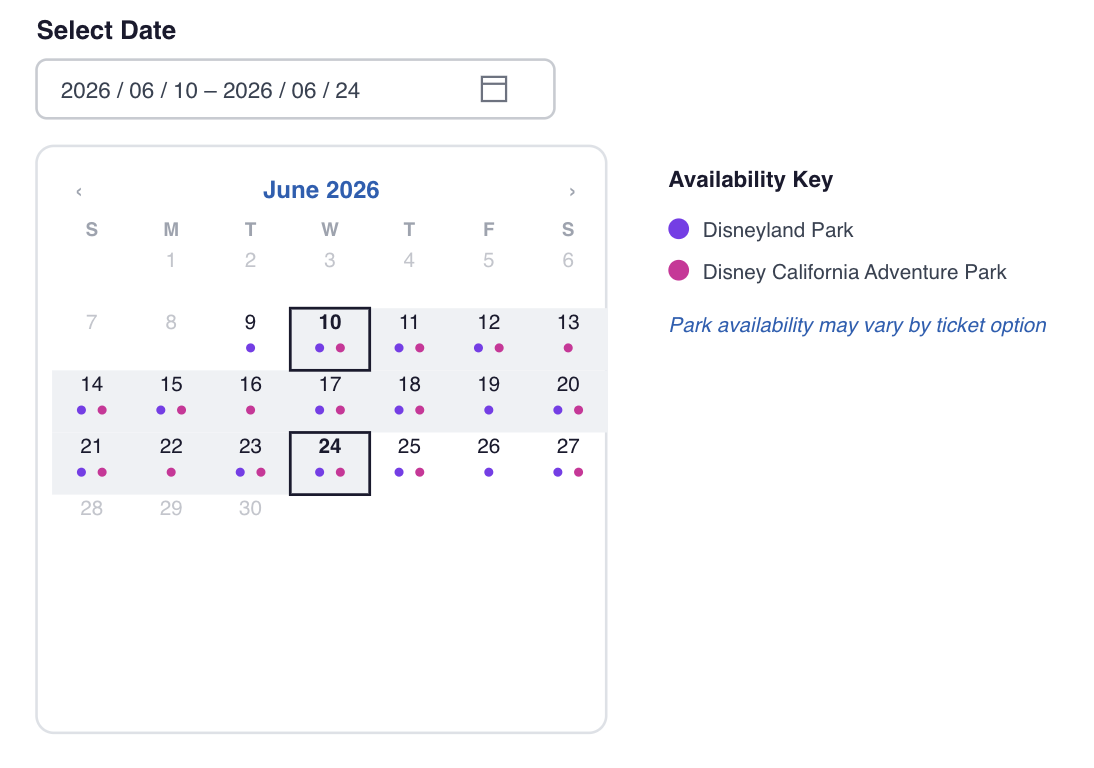
Render a date picker showing which dates have capacity
Read
disney-availableParksfrom availability extensions to know the parks that are available on specific datesAt this stage you will not receive availability for blockout dates
Step 3 - Traveler Type Selection & Group Preference
The guest selects:
The number of guests by traveler type (Adult / Child)
Whether the group is staying together (same Rate, same parks, same days) or making independent choices
Why traveler type matters upfront: Add-on components are defined at the Traveler level and have separate IDs and prices per traveler type. You need to know the guest breakdown before fetching add-on data so you can retrieve and display the correct add-ons for each group.
Why decide "together vs. independent" here: This decision determines whether Rate selection (next) and the per-day park/date choices are made once for the whole group, or separately per traveler. Travelers on the same booking are not required to share the same Rate - an independent choice can mean a different Rate per traveler, on top of different park or day selections. Deciding this now, rather than at the per-day selection step, avoids re-collecting availability and pricing later.
Staying together? Continue as a single group through Steps 4–7, picking one Rate and one set of park/day choices for everyone. This leads to the Happy Path below.
Choosing independently? Repeat Rate selection and Steps 4–7 per traveler (or sub-group), each potentially on a different Rate. This leads to the Branching Path below.
Step 4 - Rate Selection
For the group, or if independent, for each traveler/sub-group, select the rate: 1-Park-Per-Day or Park Hopper.
Step 5 - Fetch Add-On Data for Selected Date
Now fetch add-on availability and pricing, scoped tightly to the selected date (addOn=true).
These responses contain add-ons for every day within the fuse window, bundled together. Index each add-on entry by its localDateTimeStart to build your per-day park selection data structure.
Step 6 - Per-Day Park Selection UI
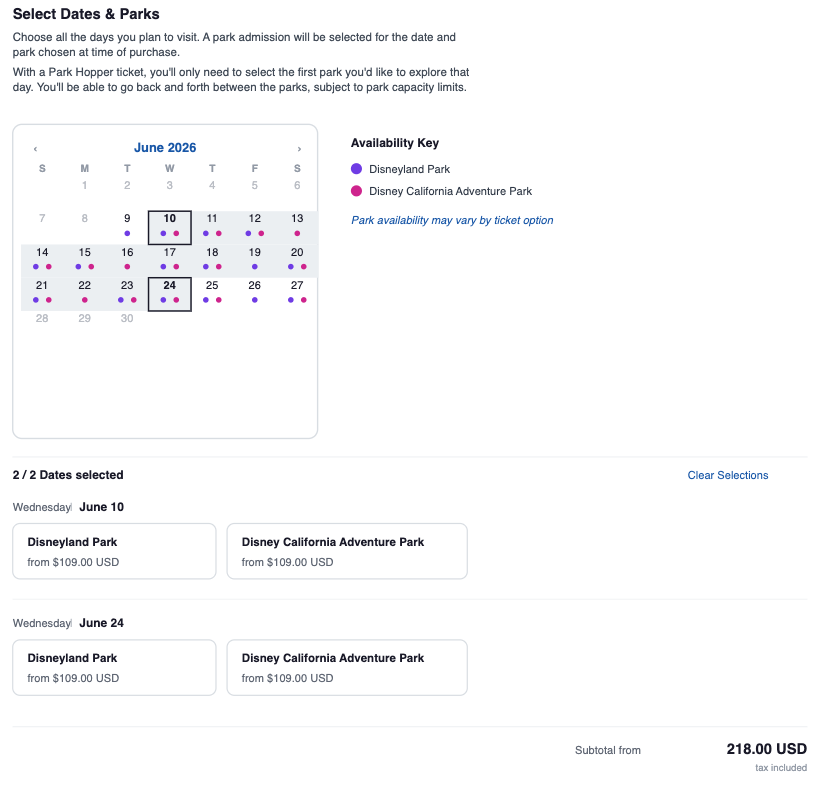
Display the full fuse window date range (start date through disney-fuseWindowDays). For each day in the range, show the available park admissions. The guest needs to fill in exactly as many visit days as their ticket allows - two days for a 2-Day ticket, three for a 3-Day, and so on.
The guest must fill in exactly as many visit days as their ticket allows - 2 days for a 2-Day ticket, 3 for a 3-Day, and so on.
Validate before proceeding:
Single Day: exactly one park admission selected per visit day per traveler
Multi-Day ticket: park admissions present for each visit day per traveler
No visit day left unassigned
All dates fall within the fuse window
Step 7 - Pricing Rules
Before submitting the Hold, calculate and display the total price:
The base ticket price is not the total. Under the component model, the base traveler/unit price does not represent the full cost. The total price the guest pays is the sum of all selected add-on prices across all visit days and all travelers.
For example, 2 adults on a 2-Day Park Hopper with Disneyland on Day 1 and California Adventure on Day 2, both with Lightning Lane on Day 1:
Price fields must be populated by you. When submitting the Hold, you must explicitly include net, retail, and (if applicable) original on every add-on item, sourced from the Price Schedule response. Travel Curious does not inject or calculate add-on prices at the Hold or Booking stage.
Step 8 - Create Hold
Submit the Hold with the base items and all add-on selections built in previous steps. The Hold response echoes back the add-ons as submitted.
Happy Path - All Travelers Selecting the Same Options
Branching Path - Each Traveler Choosing Independently
Pre-Submission Validation Checklist
Before submitting a DLR Hold, verify:
Every visit day for every traveler has at least one park admission add-on
Single Day: exactly one park admission selected per visit day per traveler
Multi-Day ticket: park admissions present for each visit day per traveler
All
localDateTimeStartvalues fall underdisney-fuseWindowDaysand match the add-on datesnetandretailon every add-on item are sourced
Step 9 - Create Booking
Convert the Hold to a Booking using the standard flow including add-ons.
Related Resources
🔗 Find the full details in Travel Curious Reseller API Reference 1.3 (Beta)
🔗 See Add-Ons for the general Add-Ons capability reference applicable to all Suppliers.