
Travel Curious NotificationsTravel Curious's Notifications API alerts you to changes based on configured rules. You will only receive notifications for the specific services you have registered for via Notification Registry. Notifications are sent via HTTP POST requests and cover the following event types:
Channel Bindings
Supplier Updates
Product Updates
Rate Updates
Availability Changes
Price Schedule Changes
Booking Updates
Each notification contains key identifiers (e.g., supplierID, productID, operation) to help trigger the appropriate API requests.
API Calls in response to API Notifications
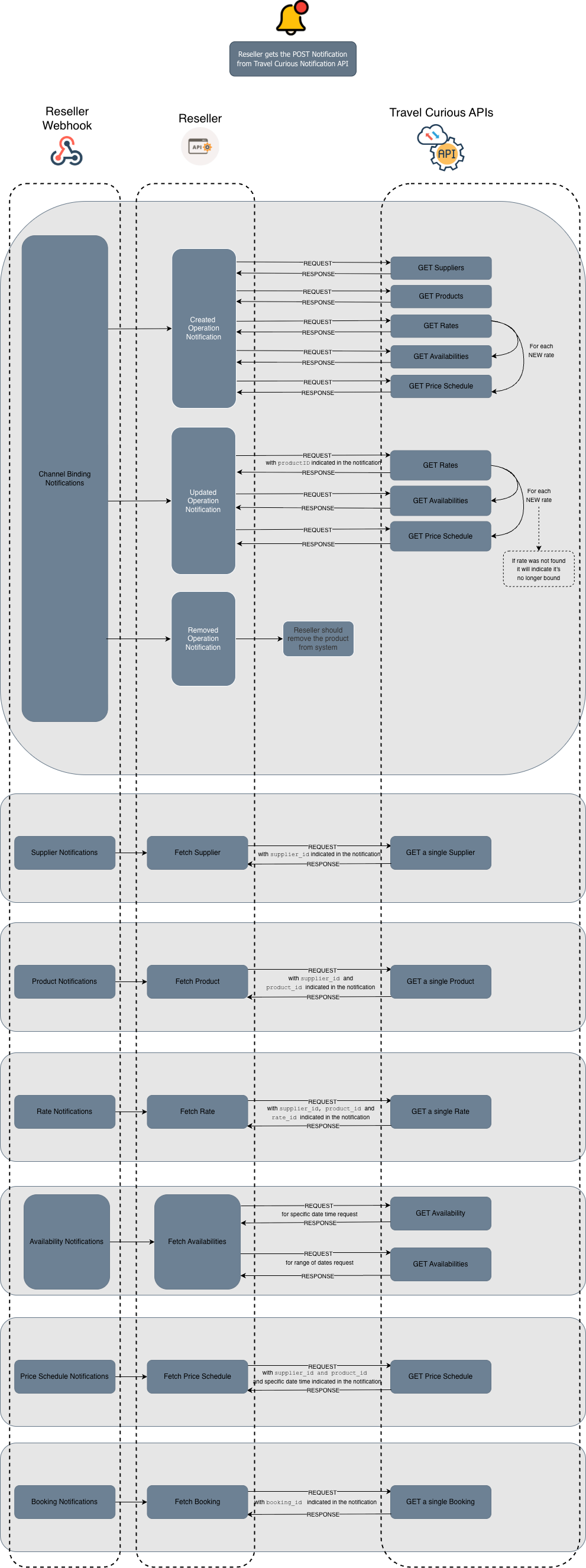
When a notification is received, determine the change type (operation), when applicable, and make the relevant API calls to synchronize your system. Use the provided identifiers to retrieve updated data. The following table summarises the API endpoint calls for each notification type, as described in the diagram above.
NOTIFICATION TYPE | API CALLS IN RESPONSE TO API NOTIFICATIONS |
|---|---|
Channel Bindings | GET Suppliers, GET Products, GET Rates, GET Availabilities, GET Price Schedule |
Supplier | |
Product | |
Rate | |
Availability | |
Price Schedule | |
Booking |
Channel Binding Notifications
Channel binding notifications cover any changes related to the bindings that are connected to you, the Reseller, which can include both Product and Rate levels. In other words, notifications are triggered by changes at either level - whether it's a Product or the associated Rate that has been updated. However, the notification itself typically only includes the Product information. This is because, in practice, Products are the primary reference point when looking up changes, and Rate adjustments are tied to the Products they belong to. Therefore, the notification may not explicitly detail Rate changes, but they are still relevant and part of the binding process.
Receive a Channel Binding Notification when below configurations are performed:
💻 Operations
created- Triggered when a new binding is established at the Product level. This could be the first Rate being bound or when the entire Product is newly bound.updated- Triggered when changes are made to bound Products and Rates, such as Rate-level adjustments within an already-bound Product.You already have a Product (e.g., a tour or experience) bound to your system. Later the Supplier adds a new Rate (like “Early Bird” or “VIP”) under that Product. Since this new Rate becomes part of the existing binding, Travel Curious will send an
updatedchannel binding notification to reflect that change.
removed- Triggered when the entire binding is removed. Only happens when it is removed in full, the Product and all the Rates under it.
ℹ️ Note: At this time, any Rate changes, whether a Rate was created or removed, will always register as an update event as the Rate object is associated with a Product and its data. This is not a pricing change.
ℹ️ Note: neither rateID nor the start and end dates are part of the notification body here, but the operation field is present. In this case, you will get the notification with the details to identify the corresponding changes.
How to Handle Each Case
Created: If it is a
createdcase, you should call all sets of Travel Curious's APIs to sync the data in your system, this includes GET Suppliers, GET Products, GET Rates, GET Availabilities and GET Price Schedule.Removed : If it is a
removedcase you should remove that Product from your system.Updated:
Call Get Rates with the corresponding Product ID from the notification
Iterate through those Rates to compare them with the ones connected in your system
For each NEW Rate call GET Availabilities and GET Price Schedule
For each already known Rate, no action is needed
If a Rate is missing, it will indicate it's no longer bound
🔍 Filtering Channel Binding Notifications
Notification rules support filtering so you can limit which binding events your system receives. These filters are configured in the ChannelBindingConfig object when you register your rule.
You can apply the following optional filters:
supplierIDs- Receive notifications only for specific Suppliers.productIDs- Receive notifications only for specific Products.
If either field is specified, only binding events matching those Supplier IDs or Product IDs will be delivered to your endpoint. If omitted, the rule applies to all Suppliers and Products visible to your channel.
Filtering is particularly useful when:
You only onboard or sync a subset of suppliers
You want to monitor specific products
You want to reduce unnecessary update volume
You are testing notification flows with isolated data
Filtering does not change the operations (created, updated, removed). It only limits which items generate notifications for your integration.
🏷️ Identifiers Included in the Notification
supplierID- the unique identifier of the Supplier, as used in the Booking/Reseller APIs.productID- the unique identifier of the Product, as used in the Booking/Reseller APIs.operation-created,removedorupdated.sum- a secure SHA256 HMAC checksum (in hexadecimal format) used to verify the authenticity of the notification. To validate it, generate a checksum using thetimestamp,token, and yoursecurity_key. If your result matches thesum, the notification is considered authentic and untampered.timestamp- unix timestamp of when the signature was generated.token- a unique authentication token for this message. It’s used along with thetimestampand yoursecurity_keyto generate and validate thesum(checksum), ensuring the notification's authenticity.
💡 Recommendation: Use the Channel Binding Test Notification Endpoint to safely simulate binding notifications without affecting production data.
Supplier Notifications
When receiving supplier-related notifications, the alert message will inform you of updates to Supplier details bound to your system, such as changes to Supplier contact information.
Receive a Supplier Notifications Notification when below configurations are performed:
💻 Operations
updated- Currently, only this operation type is supported for Supplier notifications, meaning you will receive alerts when existing Supplier data is modified.
How to Handle Each Case
Updated: The notification will include the
supplierID, which you can use to identify the corresponding changes. Use this ID to make the appropriate Supplier API request.
🔍 Filtering Supplier Notifications
Supplier notification rules support filtering through the optional field:
supplierIDs- limits notifications to specific Suppliers.
If you provide a list of supplierIDs, you will only receive Supplier-level operations for those specific Suppliers. If omitted, the rule applies to all Suppliers visible to your channel.
Filtering is useful when:
You want to test Supplier visibility changes
You manage Supplier relationships selectively
🏷️ Identifiers Included in the Notification
supplierID- the unique identifier of the Supplier, as used in the Booking/Reseller APIs.productID- the unique identifier of the Product, as used in the Booking/Reseller APIs.operation-updated(this is the only operation currently supported for this type of notification).sum- a secure SHA256 HMAC checksum (in hexadecimal format) used to verify the authenticity of the notification. To validate it, generate a checksum using thetimestamp,token, and yoursecurity_key. If your result matches thesum, the notification is considered authentic and untampered.timestamp- unix timestamp of when the signature was generated.token- a unique authentication token for this message. It’s used along with thetimestampand yoursecurity_keyto generate and validate thesum(checksum), ensuring the notification's authenticity.
💡 Recommendation: Use the Supplier Test Notification Endpoint to safely simulate Supplier notifications without affecting production data.
Since Supplier visibility is managed through channel bindings, Channel Bindings Notifications are the primary source for tracking newly accessible Suppliers.
Product Notifications
Product Notifications will alert you about changes to Product data, such as updates to descriptions, hours, or location details.
💻 Operations
updated- Currently, only this operation type is available, so notifications will be triggered whenever Product information is modified.
How to Handle Each Case
Updated: The notification will contain the
supplierIDandproductID, allowing you to track the relevant changes. Use these IDs to make the necessary Product API request.
🔍 Filtering Product Notifications
Product notification rules support two filter types:
supplierIDs- receive product notifications only for specified SuppliersproductIDs- receive notifications only for specific Products
If neither is supplied, notifications apply to all Products available to your channel.
Filtering is useful when:
You only actively watch a subset of Suppliers
You want to sync or monitor specific Products
You want to reduce noise in your catalog ingestion
🏷️ Identifiers Included in the Notification
supplierID- the unique identifier of the Supplier, as used in the Booking/Reseller APIs.productID- the unique identifier of the Product, as used in the Booking/Reseller APIs.operation-updated(this is the only operation currently supported for this type of notification).sum- a secure SHA256 HMAC checksum (in hexadecimal format) used to verify the authenticity of the notification. To validate it, generate a checksum using thetimestamp,token, and yoursecurity_key. If your result matches thesum, the notification is considered authentic and untampered.timestamp- unix timestamp of when the signature was generated.token- a unique authentication token for this message. It’s used along with thetimestampand yoursecurity_keyto generate and validate thesum(checksum), ensuring the notification's authenticity.
💡 Recommendation: Use the Product Test Notification Endpoint to safely simulate Product notifications without affecting production data.
Using both Product Notifications and Channel Bindings Notifications ensures full visibility into Product availability and updates within your system.
Rate Notifications
Rate Notifications inform you about updates to Rate details, such as cancellations, holdable, hours and traveler conditions.
💻 Operations
updated- At this time, only this operation type is supported, meaning alerts are triggered whenever existing Rate information is modified.
How to Handle Each Case
Updated: The notification will include the
supplierID,productIDandrateID, enabling you to track relevant changes. Use these IDs to make the appropriate Rate API request.
🔍 Filtering Rate Notifications
Rate notification rules support the following optional filters:
supplierIDs- receive notifications only for Rates belonging to specific SuppliersproductIDs- receive notifications only for Rates under specific ProductsrateIDs- receive notifications only for specific Rates
These three filtering layers give you fine-grained control over which Rate changes your system receives.
If none of these filters are provided, the rule applies to all Suppliers, Products, and Rates available to your channel.
Use filtering when:
You need to sync Rates only for certain Suppliers
You only distribute (or test) specific Products
You only want notifications for a limited set of RateIDs
You want to reduce high-volume update processing for unused parts of your catalog
🏷️ Identifiers Included in the Notification
supplierID- the unique identifier of the Supplier, as used in the Booking/Reseller APIs.productID- the unique identifier of the Product, as used in the Booking/Reseller APIs.rateID- the unique identifier of the Rate, as used in the Booking/Reseller APIs.operation-updated(this is the only operation currently supported for this type of notification).sum- a secure SHA256 HMAC checksum (in hexadecimal format) used to verify the authenticity of the notification. To validate it, generate a checksum using thetimestamp,token, and yoursecurity_key. If your result matches thesum, the notification is considered authentic and untampered.timestamp- unix timestamp of when the signature was generated.token- a unique authentication token for this message. It’s used along with thetimestampand yoursecurity_keyto generate and validate thesum(checksum), ensuring the notification's authenticity.
💡 Recommendation: Use the Rate Test Notification Endpoint to safely simulate Rate notifications without affecting production data.
Using both Rate Notifications and Channel Bindings Notifications ensures full visibility into Rate availability and updates within your system.
Availability Notifications
Receive an Availability Notification when Availability data changes.
Availability Notifications are not sent for all changes, these notifications are triggered based on the thresholds set during rule configuration Notification Registry (e.g., maxLookAheadDays, vacanciesUnder).
The availability information is primarily forwarded as received from supplier systems without modification. Consequently, the handling of this data can vary based on its original format when provided to Travel Curious; it may consist of either individual notifications or multiple notifications for each day. Therefore, you have the option to either Retrieve a list of availabilities or Retrieve a single availability.
💻 Operations
This rule is not operation-based, instead, it uses configuration parameters to control when a notification is sent.
You can fine-tune notifications using the following config:
maxLookAheadDays: The number of days into the future to monitor for changes (default:7).vacanciesUnder: Used to filter availabilities based on their vacancies. If an availability change does not cause the vacancies to drop below the provided value, no notification will be issued. If set to0all changes inside themaxLookAheadDayswill trigger a notification (default:0).
How to Handle Each Case
In the notification, you will get the
supplierID,productID,rateIDandstartandenddate to identify the corresponding changes and use those details to make the appropriate API call(s), either Retrieve a list of availabilities or Retrieve a single availability.
🔍 Filtering Availability Notifications
Availability rules support:
supplierIDs- restrict availability updates to specific SuppliersproductIDs- restrict updates to availability belonging to specific ProductsrateIDs- restrict availability updates to specific Rate IDs only
If omitted, notifications apply to all eligible Rates and Products.
Filtering is used when:
Ensure precise oversight of inventory for high-priority products
You want to limit high-volume availability traffic
You wish to isolate suppliers during testing
🏷️ Identifiers Included in the Notification
supplierID- the unique identifier of the Supplier, as used in the Booking/Reseller APIs.productID- the unique identifier of the Product, as used in the Booking/Reseller APIs.rateID- the unique identifier of the Rate, as used in the Booking/Reseller APIs.start– the start of the date range (in RFC-3339 format) for which availability data has changed. Used to narrow down what should be fetched via GET endpoints.end– the end of the date range (in RFC-3339 format) for which availability data has changed. Used to define the full-time window impacted by the update.sum- a secure SHA256 HMAC checksum (in hexadecimal format) used to verify the authenticity of the notification. To validate it, generate a checksum using thetimestamp,token, and yoursecurity_key. If your result matches thesum, the notification is considered authentic and untampered.timestamp- unix timestamp of when the signature was generated.token- a unique authentication token for this message. It’s used along with thetimestampand yoursecurity_keyto generate and validate thesum(checksum), ensuring the notification's authenticity.
💡 Recommendation: Use the Availability Test Notification Endpoint to safely simulate availability notifications without affecting production data.
Price Schedule Notifications
Receive a Price Schedule Notification when Pricing data changes.
💻 Operations
This rule is not based on operations. Instead, it uses configuration parameters to control the notification window.
You can configure:
maxLookAheadDays: The number of days into the future to monitor for price changes (default:7).
How to Handle Each Case
In the notification, you will get the
supplierID,productIDandstartandenddate information. Note, in this case, therateIDis not part of the notification body, but with the other details, you are still able to identify the corresponding changes and use those details to make the appropriate GET Price Schedule API call.
🔍 Filtering Price Schedule Notifications
Supported filters:
supplierIDs- only receive pricing changes for specific SuppliersproductIDs- only receive pricing changes for specific ProductsrateIDs- only receive pricing changes for specific Rates
If omitted, all Price Schedule changes will generate notifications.
Use filtering when:
You want to keep a close watch on high-frequency pricing updates
You selectively distribute Rates
🏷️ Identifiers Included in the Notification
supplierID- the unique identifier of the Supplier, as used in the Booking/Reseller APIs.productID- the unique identifier of the Product, as used in the Booking/Reseller APIs.start– the start of the date range (in RFC-3339 format) for which price data has changed. Used to narrow down what should be fetched via GET endpoints.end– the end of the date range (in RFC-3339 format) for which price data has changed. Used to define the full-time window impacted by the update.sum- a secure SHA256 HMAC checksum (in hexadecimal format) used to verify the authenticity of the notification. To validate it, generate a checksum using thetimestamp,token, and yoursecurity_key. If your result matches thesum, the notification is considered authentic and untampered.timestamp- unix timestamp of when the signature was generated.token- a unique authentication token for this message. It’s used along with thetimestampand yoursecurity_keyto generate and validate thesum(checksum), ensuring the notification's authenticity.
💡 Recommendation: Use the Price Schedule Test Notification Endpoint to safely simulate price schedule notifications without affecting production data.
Booking Notifications
Booking Notifications inform you of booking-related events, such as cancellations or confirmation of tickets attached to confirmed bookings - applicable only when 202 responses are supported. These notifications allow you to stay in sync with the booking status.
💻 Operations
Currently, the following operation types are supported:
canceled– Triggered when a booking has been canceled.tickets-added– Triggered when tickets are confirmed after a booking was initially accepted with a202response. This is useful for detecting when tickets have actually been generated and associated with a booking.
When a tickets-added notification is received, your system should treat it as a confirmation that the booking is finalised and tickets are now available for retrieval. This typically follows an earlier 202 Accepted response from the Booking API.
How to Handle Each Case
Canceled: Mark the booking as canceled in your system
Tickets-added:
Store the ticket payload
Mark the booking as
confirmedUpdate your delivery mechanisms (email, voucher generation, partner APIs)
🔍 Filtering Booking Notifications
Supported filters:
supplierIDs- only receive booking changes for specific SuppliersproductIDs- only receive booking changes for specific ProductsrateIDs- only receive booking changes for specific Rates
If omitted, your rule applies to all bookings you receive.
Use filtering when:
You isolate certain Rates (e.g., VIP vs Standard)
You want to reduce noise from large booking volumes
Filtering does not change the available operations.
🏷️ Identifiers Included in the Notification
bookingID– the unique identifier assigned by Travel Curious for the booking.startTime– the scheduled start time of the booking.resellerBookingReference– the reseller reference ID, used by the Booking API partner to provide your own reference for the booking.operation–canceledortickets-addedsum- a secure SHA256 HMAC checksum (in hexadecimal format) used to verify the authenticity of the notification. To validate it, generate a checksum using thetimestamp,token, and yoursecurity_key. If your result matches thesum, the notification is considered authentic and untampered.timestamp- unix timestamp of when the signature was generated.token- a unique authentication token for this message. It’s used along with thetimestampand yoursecurity_keyto generate and validate thesum(checksum), ensuring the notification's authenticity.
💡 Recommendation: Use the Booking Test Notification Endpoint to safely simulate booking notifications without affecting production data.
Testing Notifications with Travel Curious's Test Endpoints
Travel Curious provides dedicated test endpoints for safely simulating notification events without impacting live data. These endpoints allow you to validate your webhook integrations for booking, event, and other notifications before going live.
🔗 See Travel Curious’s Test Endpoints for full details and usage instructions.
For more details about each endpoint and its schema, please check the Travel Curious Notifications API documentation.